The WireKit screens
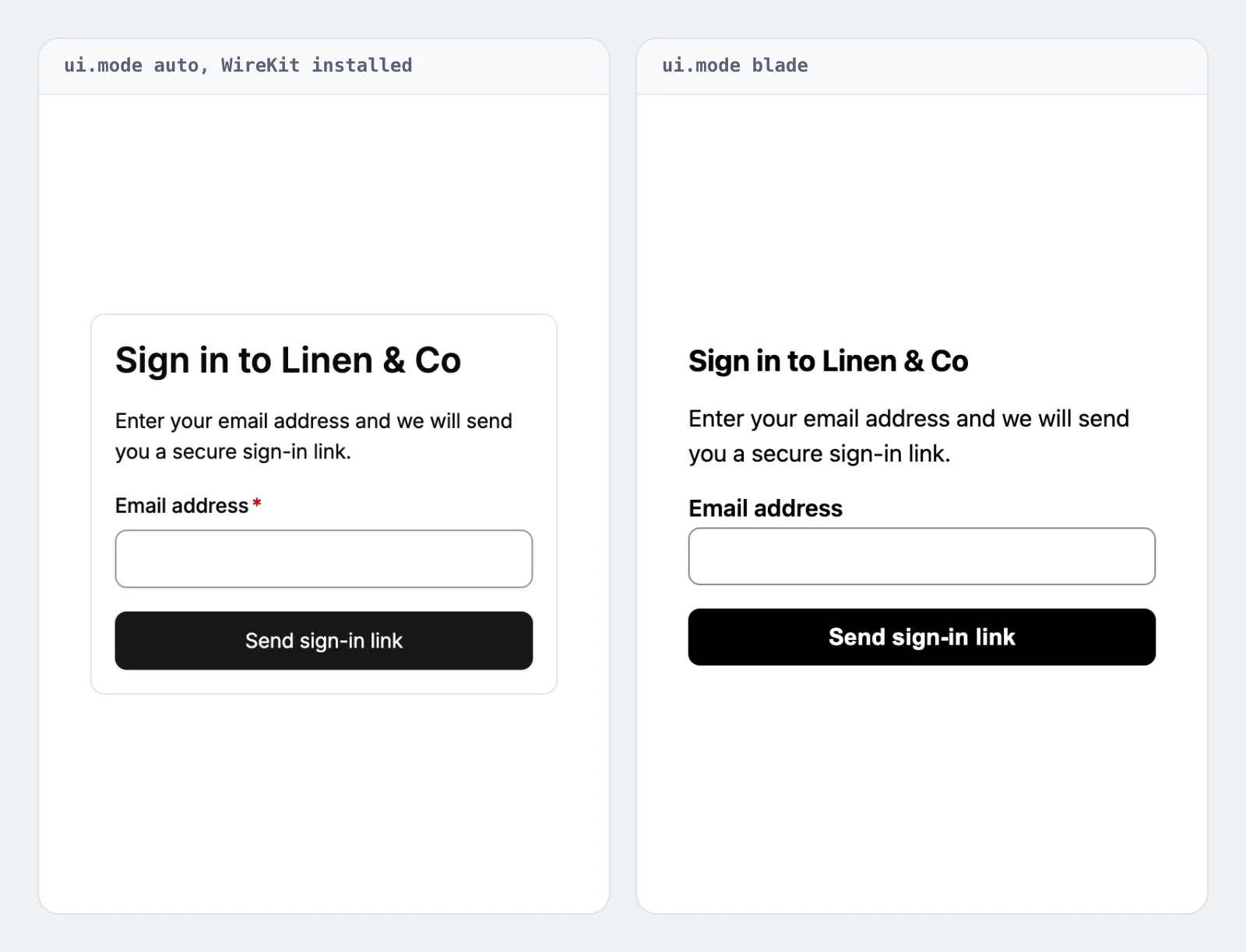
If WireKit (pushery/wirekit) is installed, the sign-in screens render
with WireKit components automatically — no configuration needed. Without it, the package
serves its own dependency-free Blade views, so it works either way. Set ui.mode to blade
to keep the plain views even when WireKit is present:
'ui' => [
    'mode' => env('EMAIL_MAGIC_LINK_UI', 'auto'), // 'auto' | 'blade'
    'vite' => ['resources/css/app.css'],
    'styles' => [],
],
What the layout wires
WireKit renders with design-token CSS variables, Tailwind utility classes, and Alpine directives, so its views ship inside a layout that wires all three:
-
Design tokens — the layout injects WireKit's
@wirekitStyles, which serves WireKit's owndist/wirekit.css(the--color-wk-*,--padding-wk-*, … tokens every component reads). This needs no build step and novendor:publish; it is what keeps the screens from rendering unstyled. -
Fonts — the layout renders
<x-wirekit::fonts />, which loads the families yourwirekit.fontsconfiguration names. The tokens alone carry the font name, not the files, so without it the screens fell back to the system font while your other pages used the kit font. Published fonts are served as static files; unpublished ones come through WireKit's own route. -
Utility classes — the arbitrary-value utilities WireKit emits (
bg-[var(--color-wk-bg-elevated)], …) are generated by your Tailwind build, so point it at WireKit's views inresources/css/app.css:@source '../../vendor/pushery/wirekit/resources/views/**/*.blade.php';The layout loads your compiled stylesheet via
@vite(configurable withui.vite, defaultresources/css/app.css; set itfalsefor a non-Vite host) and/or the plain<link>URLs listed inui.styles. -
Behavior —
@livewireScriptsand@wirekitScriptsbring in Alpine.
Content-Security-Policy
Every tag these screens emit that a strict policy would otherwise reject carries the nonce
from ui.script_nonce: the resend countdown's script tag (an external same-origin file), the
layout's inline stylesheet, the <link> and <script> WireKit itself writes, and your own
ui.styles links and Vite tags. Vite keeps a nonce you already gave it. You do not
have to configure that — leave script_nonce at null and the package finds your nonce on its
own. See Configuration for how it looks.
One thing is still asked of your policy, and it comes from WireKit rather than from this package:
script-srcmust allow'unsafe-eval', unless you switch WireKit's bundle. WireKit's components are driven by Alpine, and Alpine's default build compiles the expressions inx-dataand@keydownwith theFunctionconstructor. On these screens that is the boxed one-time-code field: without'unsafe-eval'its boxes stop advancing and pasting a whole code stops filling them. Nothing errors visibly — the field still accepts typing one box at a time, so the loss is easy to miss.
There are two answers:
ui.mode = 'blade'needs no exception at all. The plain screens carry the same flow and use no Alpine and no Livewire.- Livewire's CSP build. On these screens the Alpine that runs is Livewire's:
@wirekitScriptsforce-injects Livewire's assets so Alpine reaches a page that renders no Livewire component, Livewire's tag carries nodeferand executes first, and WireKit's own bundle registers its plugins on that Alpine and never starts one of its own. So the switch that matters is Livewire's — setcsp_safetotrueinconfig/livewire.php(Livewire 4), which serves a build that interprets expressions instead of constructing functions. Leavewirekit.scripts.bundleat its default: on these screens WireKit'scspbundle detects the Alpine already on the page, registers against it and starts nothing, so it changes the policy question not at all.
One further thing these screens need from you in a non-English application: WireKit's own screen-reader strings are translated by your application, not by this package. See Translations.
Only the look differs
The flow itself is unchanged — the same signed routes, CSRF-protected POSTs, and single-use
token consumption. The bundled WireKit screens are covered by a real-browser suite that
renders each one at desktop and mobile widths and asserts it is genuinely styled, not merely
that the text is present.
A form sent twice
A double click sends a form twice, and the second request finds what the first one spent: the link, the
code or the invitation is used up, so the browser shows the refusal although the first request signed the
person in. Every form of the bundled screens, the WireKit set and the plain one, carries
data-email-magic-link-form, set to request, code or confirm, so a script of your application can hold
the second click back without overriding a view:
document.querySelectorAll('form[data-email-magic-link-form]').forEach((form) => {
    form.addEventListener('submit', (event) => {
        if (form.dataset.submitted === 'true') {
            event.preventDefault();

            return;
        }

        form.dataset.submitted = 'true';
    });
});
The page an invitation is accepted on is your own view, so its form takes the attribute from you.
Without a script the package answers the second request itself. Signing in replaces the session the first
request arrived with, and the second request still carries it, together with the link, the code or the
invitation the first one spent. Where both match a sign-in made within the last minute, the second request is
answered as that sign-in: the person is signed in again through the same authenticator, so a second factor is
still asked for, and an invitation that signed nobody in gets the same redirect. The host's invitation handler is
not asked twice, and MagicLinkVerified and InvitationAccepted are announced once. Any other refused request
keeps the refusal of a spent credential. The note lives in your application's cache for that minute, under a hash
of the session and the credential.
Serving your own screens
Publish the views and edit them:
php artisan vendor:publish --tag=email-magic-link-views
They land in resources/views/vendor/email-magic-link. Published views win over both the
WireKit and the plain bundled set.