Quick start
Out of the box the package registers a complete browser flow under the web middleware
group. No controllers to write, no views to build.
The routes you get
| Method | URI | Name | Purpose |
|---|---|---|---|
GET | /magic-link | email-magic-link. | "Enter your email" form |
POST | /magic-link | email-magic-link. | Issue a link or code |
GET | /magic-link/ | email-magic-link. | Inert, signed confirmation page |
POST | /magic-link/ | email-magic-link. | Consume a magic link |
GET | /magic-link/ | email-magic-link. | Enter a one-time code |
POST | /magic-link/ | email-magic-link. | Consume a one-time code |
GET | /magic-link/ | email-magic-link. | The resend countdown's client script, a same-origin file |
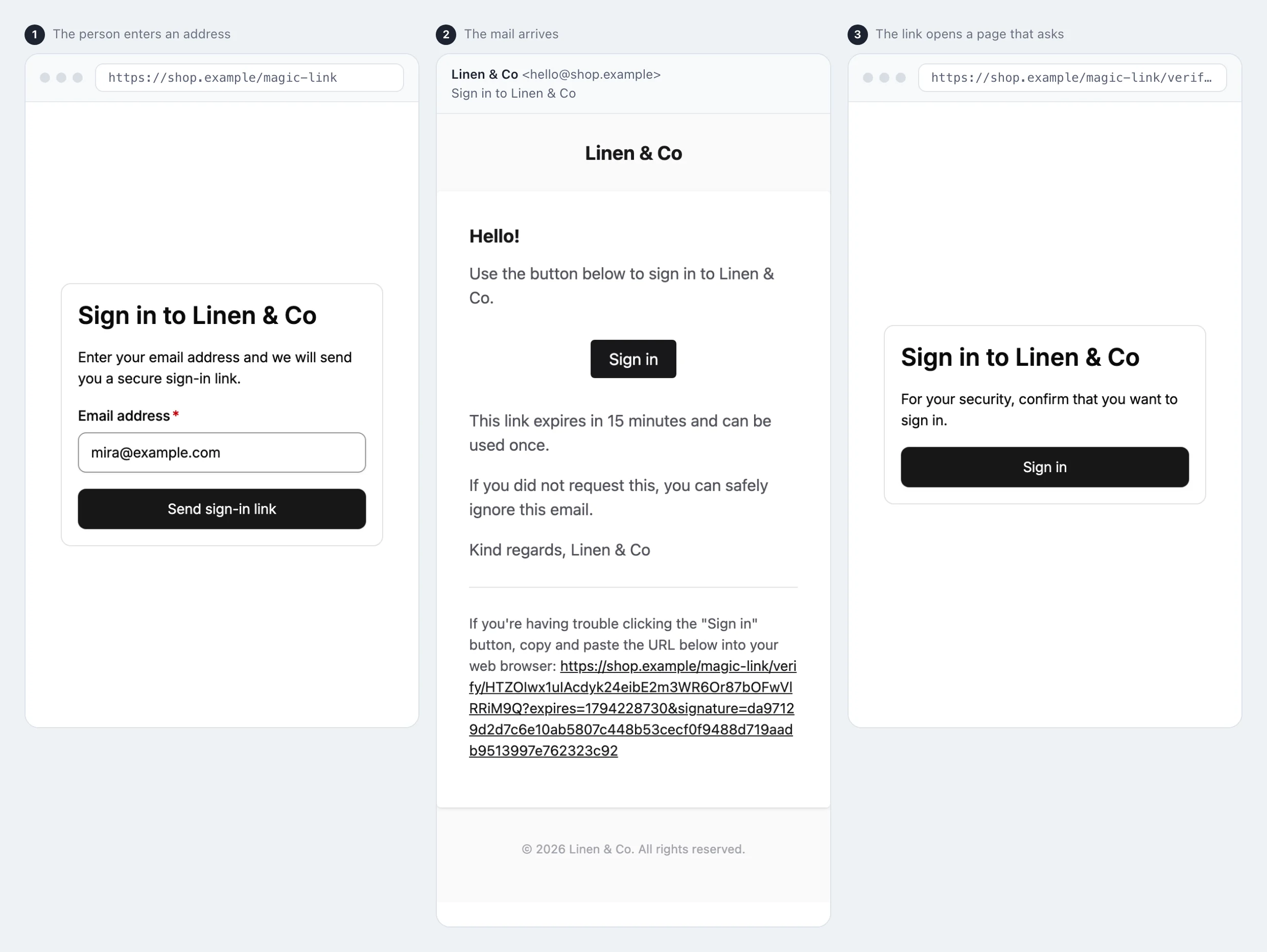
Point your "log in" link at route('email-magic-link.request.form') and you have
passwordless login. A user enters their email, receives a link, clicks it, confirms, and is
signed in.
The middleware, signing and rate limiting on each route are in the
route reference. Move the whole flow behind a prefix, or change its
middleware, with the routes.* keys in Configuration.
Why a magic link costs one extra click
Because consumption is POST-only, the user clicks the emailed link (a GET) and then
clicks "Sign in" on the confirmation page. That second click is the price of being safe
against link-following security scanners and prefetch — tools that would otherwise spend a
single-use token before the person ever sees it. We consider that trade-off worth it; it is
the whole point of the package.
For first-party SPA or mobile clients that exchange the token over JSON without an
interstitial, set api.enabled = true and send Accept: application/json. See
The JSON contract.
What happens on a successful sign-in
- The
POSTclaims the token in a single atomic, race-free conditional update. - If the Fortify bridge is active and the user has two-factor authentication enabled by
Fortify's own verdict (confirmed, when Fortify's
confirmoption is on), the request is handed to Fortify's challenge without logging anyone in — see The two-factor handoff. - Otherwise the user is logged in with
Auth::login, the session id is regenerated, and the request is redirected to the originally intended URL (orroutes.redirect_to).
Every step fires an event you can listen to; the payloads are in the event reference.
Next
- Configuration — the three Fortify setups, token lifetimes, and the response an invalid link gets.
- Minting links and codes yourself — deliver a credential over SMS, chat, or your own transactional email.
- Security model — what each design decision defends against.