The screen
An application with Livewire embeds the self-service screen on a page of its own settings:
<livewire:sanctum-hardening.tokens />
Put the page behind auth. The screen mints through PersonalTokens, which refuses
a mint without a password confirmed a moment ago, and where none was, the screen asks for the
password itself (below). Behind password.confirm, it never has to ask.
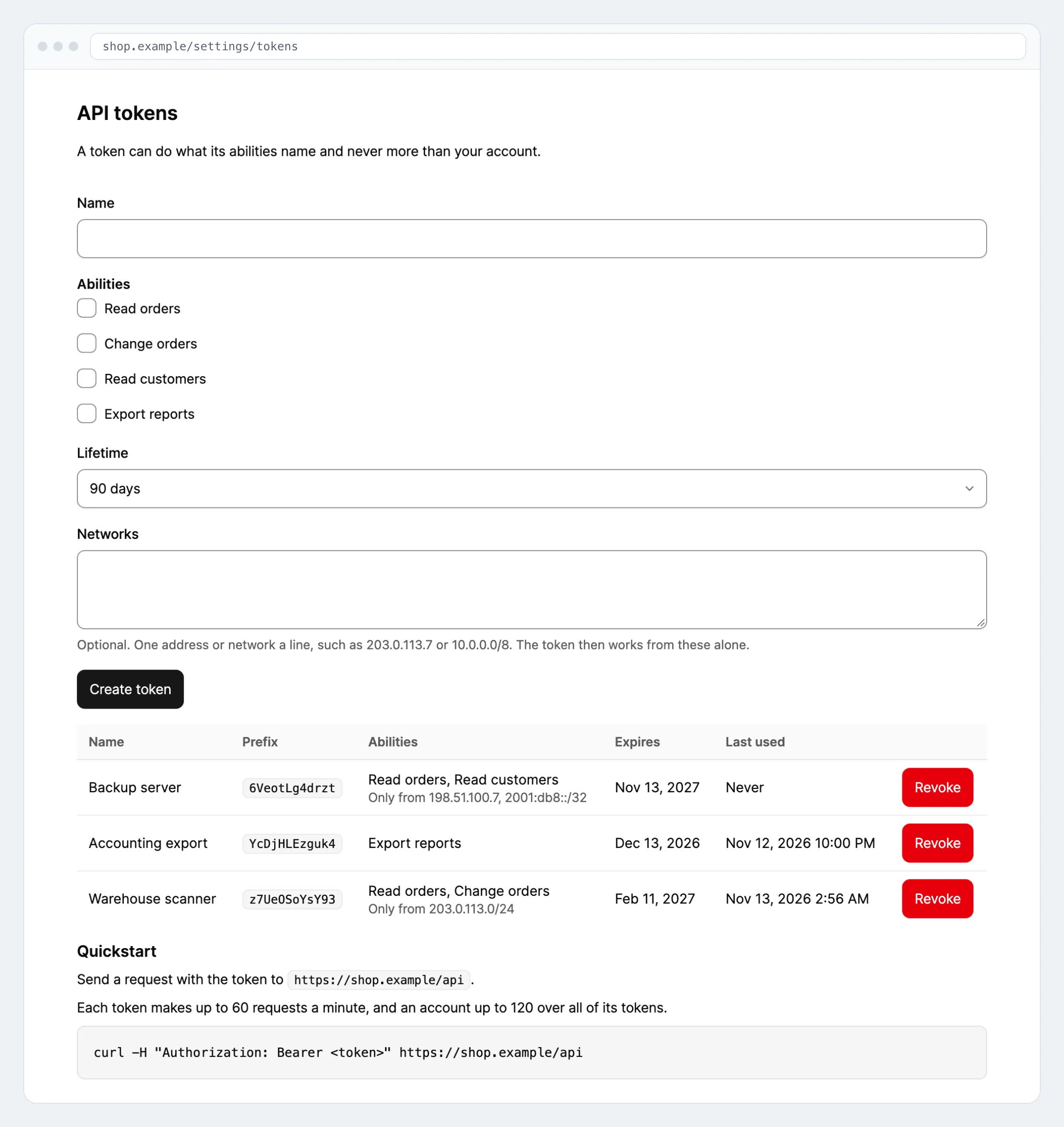
What it shows
- A form with a name, the abilities of the catalog a person may grant, and the
lifetimes a mint accepts, never one over
minting.max_lifetime. A reserved ability is never among them. An optional field takes the addresses and networks the token may be used from, one a line, as a mint limits it; left empty, the token works from anywhere. - The plain text of a new token, once, on the answer to its mint. The next action clears it.
- Every token of the signed-in user, the newest first, with its name, prefix, abilities, the networks it is limited to, expiry, last use and latest requests, and a button that revokes it after asking. A token with a reserved ability is not listed.
A refusal is said on the status line, which a screen reader announces.
The tokens of another holder
Given a model, the screen manages that holder's tokens instead of the signed-in user's, a workspace's for instance:
<livewire:sanctum-hardening.tokens :tokenable="$workspace" />
It mints, lists and revokes through mintFor(), listFor() and revoke() with that holder, so
the Gate decides on every action, as it does for the
tokens of a workspace. The holder stays the one the page
passed: no request can point the screen at another. Where the holder is not the signed-in user, the
texts speak of the holder rather than of the account. They are the lines under screen.holder in
the package's translations, and an application that publishes them with
--tag=sanctum-hardening-lang can word them for its own holder.
The password
A mint needs a password confirmed a moment ago, as password.confirm records it in the session.
Where there is none, the screen shows a password field above the form. It checks the password
against the one the user's model holds, as the Eloquent user provider does, records the
confirmation in the session of the page's host, and allows five wrong passwords a minute for the
user and the address. An application whose users sign in through another user provider keeps the
page behind password.confirm.
The quickstart
The quickstart names the address a request with the token goes to and the limits it meets. The
address is the routes' prefix on the page's host. An API that answers on a host of its own is
named in sanctum-hardening.ui.endpoint:
'ui' => [
    'variant' => 'auto',
    'endpoint' => 'https://api.example.com/api',
],
WireKit or plain
The screen ships a view built from WireKit components and a plain one. sanctum-hardening.ui.variant
decides: wirekit, plain, or auto, the default, which renders the WireKit view where
pushery/wirekit is installed. Publish the views with --tag=sanctum-hardening-views to restyle them.